How to Use an Undated Digital Planner When Your Schedule Keeps Changing
Learn how to use an undated digital planner for shift work, freelance weeks, family life, and unpredictable routines without starting over every Monday.
Photo by Adrian Regeci on Pexels.
An undated digital planner works best when you treat it like a flexible command center, not a perfect archive of every day you meant to plan.
Why undated planners fit real life better than many dated systems
A dated planner feels satisfying when life is orderly, but many people do not live inside orderly seasons. Freelancers have irregular workloads. parents deal with school notices, appointments, and sudden disruptions. students shift between exam weeks and quieter stretches. even full-time professionals can go from a calm week to a launch week overnight. In those situations, a dated planner can quietly add pressure because every unused page starts to feel like evidence that you are behind.
An undated digital planner removes that pressure. Instead of asking you to keep up with a fixed calendar whether you are ready or not, it waits for you to use it when the routine actually needs support. That flexibility is why competitor stores often include undated options, but many of them still frame the product as a generic template library. The better perspective is this: an undated planner is a recovery-friendly planning system. It helps you restart faster after illness, travel, deadline spikes, family disruptions, or simple human inconsistency.
- arrow_right_altUse undated pages when your schedule changes more than your intentions do.
- arrow_right_altChoose undated planning when restart speed matters more than preserving a perfect archive.
- arrow_right_altTreat flexibility as a feature, not as a sign that your planning habit is weak.
What makes an undated digital planner easier to keep using
The strongest undated planners still need structure. Flexibility does not mean chaos. You still want a clear dashboard, monthly overview pages, weekly planning pages, daily pages when needed, and a notes area that can hold loose thinking without swallowing the rest of the system. This is where many low-cost marketplace planners fall short. They promise freedom, but they really offer a loose stack of pages with no obvious navigation logic.
A stronger setup feels light, but it also feels intentional. Hyperlinks matter because they make the file feel more like a workspace and less like a long PDF. Reusable weekly and daily pages matter because you can duplicate what works instead of reinventing your routine every time. Clear section labels matter because when you open your planner during a messy week, you should not have to think about where your next action belongs. If your planner reduces decisions at the moment you are already overloaded, you are much more likely to keep returning to it.
Product spotlight
A planner built for restartable routines
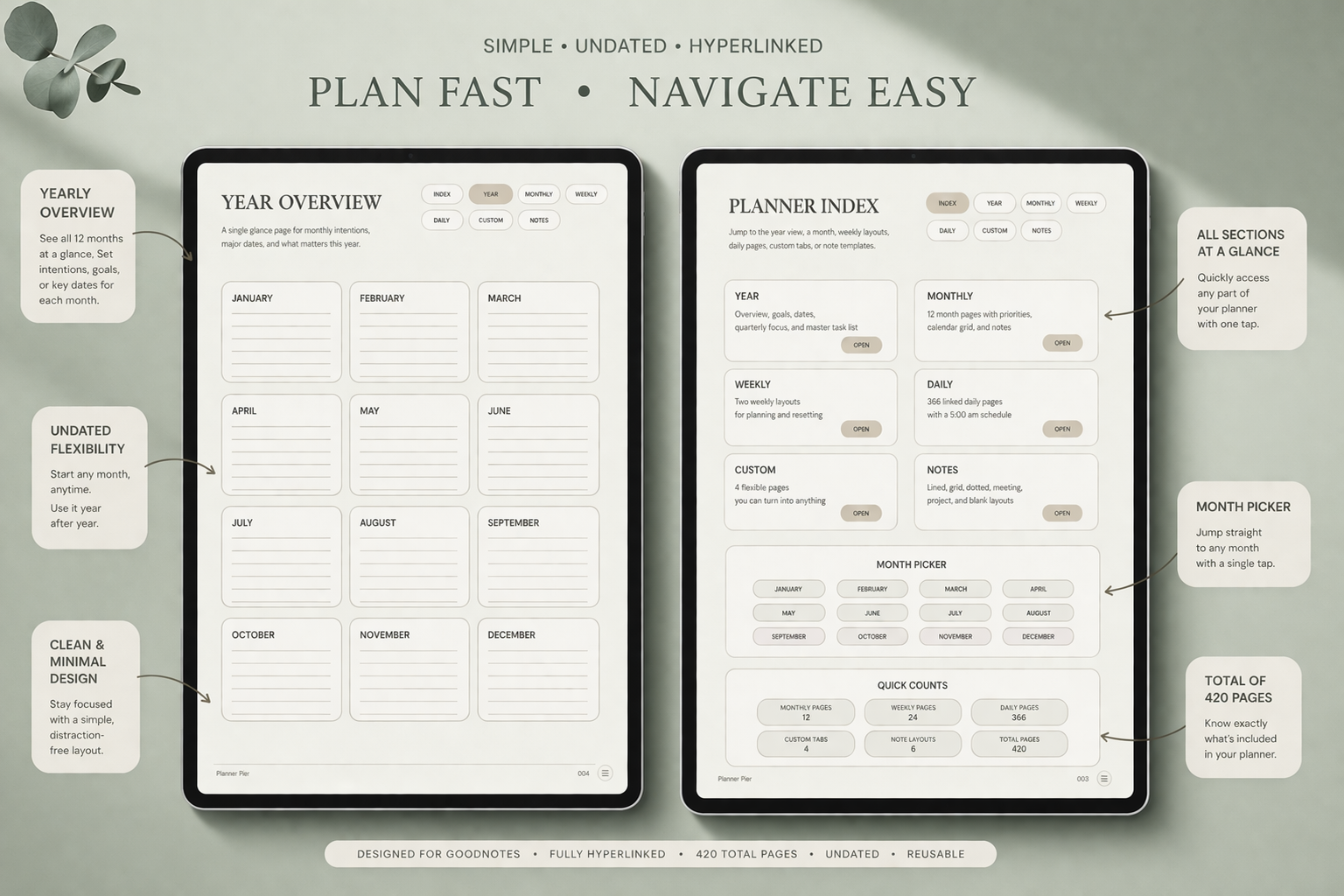
PlannerPier's Simple Undated Digital Planner is especially useful when your weeks do not look the same twice, because it gives you calm hyperlinked structure without forcing you into wasted dated pages.
- check_circle423 linked pages per planner PDF
- check_circleMonday and Sunday start versions included
- check_circleDaily, weekly, monthly, custom, and notes sections in one system
A simple weekly method for unpredictable routines
The easiest mistake with an undated planner is overbuilding it. People often think flexibility means they need endless custom sections, dozens of trackers, and a page for every possible life category. In reality, the more effective method is smaller. Start each week by creating one active weekly spread and one working notes page. Put fixed commitments down first. Then list the three to five outcomes that would make the week feel under control. Only after that should you add tasks, meal ideas, errands, or supporting notes.
If the week is especially unstable, stop planning in exact hours too early. Instead, block the week by categories such as client work, school tasks, life admin, family logistics, health, and recovery. This helps you maintain realism when time estimates are unreliable. An undated planner becomes powerful when it holds shape without demanding precision you do not yet have. That is why a minimalist weekly spread often outperforms a decorative or overly segmented one.
- arrow_right_altOpen one weekly spread at a time instead of planning six weeks ahead.
- arrow_right_altGroup uncertain tasks by category before you assign exact timing.
- arrow_right_altKeep one overflow notes page so life admin does not clutter every planning view.
How to combine monthly pages, daily pages, and notes without overwhelm
Monthly pages in an undated planner work best as visibility tools, not as detailed control centers. Use them for launches, birthdays, travel, school milestones, payment dates, or broad project deadlines. Weekly pages should then translate those broad commitments into the handful of things that matter now. Daily pages are optional support pages, not mandatory proof that you are planning correctly. On weeks when you need more focus, duplicate a daily page. On calmer weeks, stay at the weekly level.
Notes pages do a different job. They hold the ideas, reminders, and messy thinking that would otherwise spill across the planner. This distinction matters. Your planner should help you decide. Your notes should help you remember. Keeping those jobs separate lowers friction dramatically. If you want a cleaner long-form thinking space beside your planner, pairing an undated planner with the PlannerPier Digital Notebook for iPad & GoodNotes creates an especially strong system because the planner stays action-focused while the notebook absorbs projects, research, and reference material.
Why PlannerPier's Simple Undated Digital Planner is a strong fit
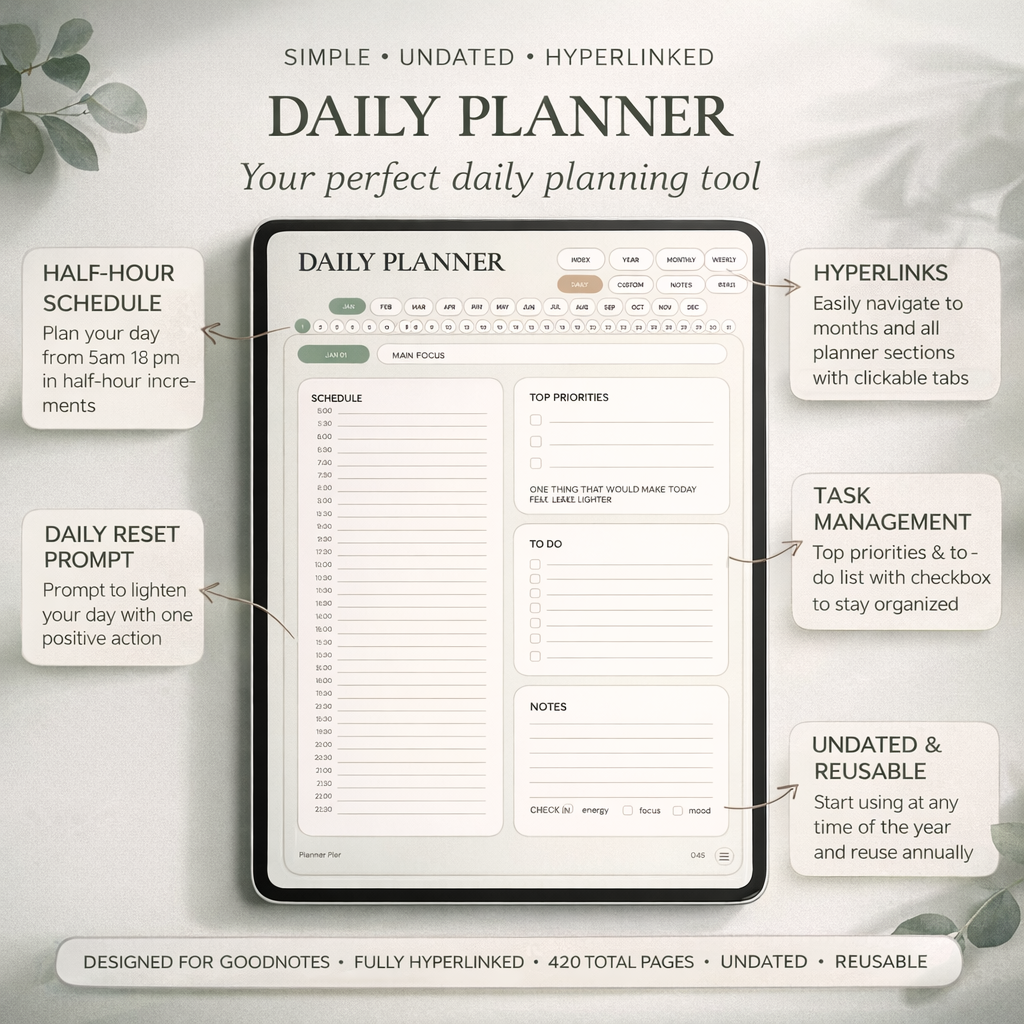
The PlannerPier Simple Undated Digital Planner for iPad is built for exactly this kind of flexible use. It includes linked yearly, monthly, weekly, daily, custom, and notes sections, which means you can keep your structure consistent while still adapting the depth of planning from week to week. You are not forced to use every page type on every cycle. You simply use more support when life is noisy and less when life is steady.
That balance is what makes an undated planner feel worth opening. PlannerPier's layout is visually calm, hyperlinked, and not overloaded with decoration, which matters when your week is already asking too much of your attention. The product also includes Monday and Sunday start PDFs, bonus covers, and matching stickers, so you get enough personalization to make the planner yours without turning setup into another project. For people who want a planning system that can bend without breaking, that is a practical advantage.
How to start this week without rebuilding your whole life
Open the planner, choose one monthly page, one weekly spread, and one notes page. Add only what is real: appointments, deadlines, and the next few meaningful actions. If you know your schedule may change, leave generous space. Then create a ten-minute weekly reset you can keep. Review what matters, move unfinished items forward, and duplicate the page types you actually used. That is enough to build momentum.
The goal of undated planning is not to make your routine look polished. It is to help you stay oriented when life refuses to stay neat. Once you accept that, an undated digital planner becomes less of a backup option and more of a genuinely smart default. If you want a soft, structured system that saves time and makes it easier to pick back up where you left off, browse PlannerPier and start with the layout that feels easiest to reopen tomorrow.
Frequently asked questions
Who should use an undated digital planner?
Undated digital planners are ideal for people with irregular schedules, shifting workloads, family disruptions, or anyone who wants more freedom to pause and restart without wasting dated pages.
Is an undated digital planner better than a dated one?
It is better when flexibility and restart speed matter more than having a fixed date structure already printed into every page.
How do I keep an undated planner from becoming disorganized?
Use a clear dashboard, work from one active weekly spread at a time, and keep notes separate from planning decisions so the system stays easy to navigate.
What is the best PlannerPier product for this kind of routine?
The Simple Undated Digital Planner is the clearest fit because it gives you hyperlinked monthly, weekly, daily, custom, and notes pages without tying the file to one rigid calendar timeline.
Choose a planner you can return to after messy weeks
If your schedule changes often, an undated system can save time, reduce guilt, and make planning easier to restart. Explore PlannerPier at https://www.plannerpier.com/ and find the digital planner that fits the way your life actually moves.