The decision removal tool
Win today.
Get a simple daily plan and start working instantly. Pick the quiz or any tool below — 3 free sessions across the platform. Premium unlocks unlimited access when you outgrow the cap.
- boltUp to 6 free sessions per browser (email unlock)
- calendar_monthClean exports on Premium
- visibilitySaved planner systems
- workspace_premiumMonthly or yearly Premium
Free Entry 01
Start with the planner quiz
The planner quiz is the fastest way to understand which planning style actually fits. It works well as the first stop before the user chooses which tool or workflow to try next.
Take the free quizarrow_forwardFree Entry 02
Start with Calendar Maker, then move into Premium
Calendar Maker is the clearest practical entry point. Visitors can use a few real sessions, see the export working, and then decide whether they want the full PlannerPier system.
Open Calendar Makerarrow_forwardPremium
Upgrade into PlannerPier Premium
Premium is the paid step after the free quiz, the free calendars, and the demos: it removes the 3-session limits and unlocks every PlannerPier tool behind one account.
See Premium plansarrow_forwardHow it works
Three steps to your planning system
1. Try a tool for free
Pick any planner tool — Calendar Maker, Weekly Planner, AI Studio — and try it with no sign-up needed.
2. See the result instantly
Get a real PDF export to see exactly how your planner works on your tablet before committing.
3. Upgrade for unlimited access
When you're ready for more, Premium removes all limits and unlocks AI workflows and saved projects.
01 · Planner Tools
Pick one tool, get the outcome fast, then warm them up.
Every tool now fits the same product logic: a few strong free sessions first, then Premium when the visitor wants saved systems, clean exports, and unlimited use.
Find Your Planner
Find the right planner in under a minute
Answer five quick questions and get matched with the PlannerPier format that fits your goals, routine, and favorite app.
- 3 free sessions
- 5 questions
- Instant match
planner.pdf
SafeGoodNotes PDF Checker
Check a planner PDF before you buy or import
Run live PDF checks for page count, hyperlinks, orientation, and GoodNotes fit. More checks unlock inside Premium.
- 3 live checks
- Runs locally
- GoodNotes-ready
Tracker PDF Generator
Create a habit tracker in seconds
Generate tracker PDFs to see the full export flow, then unlock unlimited habit, mood, and sleep trackers inside Premium.
- 3 free uses
- A5 / A4 / A3
- Habit / mood / sleep
Calendar Maker
Generate a clean calendar PDF in seconds
Create year-at-a-glance, monthly, or single-month PDFs with your 3 free sessions first. Then unlock the full planner system with Premium.
- 3 free calendars
- Full system next
- Browser-based
Weekly Planner Maker
Create a weekly planner spread in seconds
Build Mon-Sun weekly planner PDFs with vertical or horizontal layout, notes, time slots, and habit tracker options. Unlimited spreads unlock inside Premium.
- 3 free uses
- Vertical or horizontal
- A5 / A4 / A3
Page 2: checklist grocery list
Meal Planner Maker
Print a weekly meal grid plus grocery list
Export a two-page PDF: Mon–Sun breakfast, lunch, and dinner cells plus a checkbox grocery list. Perfect for meal prep and kitchen binders — unlimited exports unlock inside Premium.
- 3 free uses
- 2 pages
- A5 / A4 / A3
Income · fixed · variable · savings
Page 2: spending log with columns
Budget & Finance Planner
Monthly overview plus spending log
Export a two-page PDF: income, fixed bills, variable caps, and savings on page one; ruled transaction lines on page two. Built for iPad and print — unlimited exports unlock inside Premium.
- 3 free uses
- 2 pages
- A5 / A4 / A3
Page 2: due dates + study checklist
Student Planner
Class schedule plus assignment tracker
Two portrait pages: Mon–Fri class blocks and priorities, then due dates with checkboxes and study-session lines. Unlimited exports unlock inside Premium.
- 3 free uses
- 2 pages
- GoodNotes-ready
Daily Page Maker
Build a focused daily planner page in seconds
Create daily page PDFs with an hourly schedule, top 3 priorities, brain dump, mood check-in, water tracker, and dated or undated options. Unlimited pages unlock inside Premium.
- 3 free uses
- Hourly schedule
- Dated or undated
Day 1
Gratitude Journal
Gratitude Journal Maker
Build a 30-day gratitude journal in minutes
Create full gratitude journal PDFs with 3 customizable prompts, an optional reflection prompt, and dated or undated daily pages. More packs unlock inside Premium.
- 3 free uses
- 30 pages
- Custom prompts
Included sections
Custom Planner Builder
Build a dated planner instead of buying blind
Choose the year, start month, week start, cover style, and included sections. The free demo proves the structure first, then the premium builder unlocks hyperlinks and advanced pages.
- 3 free uses
- Dated planner
- Premium hyperlinks next
Reorder blocks, then export one portrait PDF.
Visual Planner Page Builder
Design a weekly command-center page before you export
Stack headers, mini calendars, hourly grids, todos, habits, meals, and more — reorder visually, then export a single portrait PDF. Premium saves your block stacks to your workspace.
- Drag & drop
- 12 block types
- GoodNotes-ready
Blank section
Goals
GoodNotes Tabs Generator
Build a hyperlinked tab sidebar without designing it by hand
Enter your own tab names, export GoodNotes-ready PDFs, and see the internal tab links working before the Premium plan upgrade appears.
- 3 free uses
- Internal links
- GoodNotes-ready
Planner Assembler
Merge calendar, weekly, daily, and tracker PDFs into one planner
Drag exports into order, download a single GoodNotes-ready PDF, then upgrade for unlimited pages plus a cover, linked contents, and tab navigation.
- Drag & drop
- TOC on Premium
- GoodNotes-ready
AI Planner Studio
Turn meetings, brain dumps, and goals into planner systems
Use ChatGPT-powered planner workflows to convert messy notes into structured weekly plans, roadmap briefs, and saved planner systems inside Premium.
- Premium only
- Saved projects
- Meeting / brain dump / goal
Sticker drop
Meal
Sticker of the Week
Download a planner sticker sheet fast
Preview the current weekly theme and download sticker sheets on this browser. More weekly drops unlock inside Premium.
- 3 free uses
- Weekly preview
- Planner-ready
5-lesson guide
Premium learningDigital Planning 101
Learn digital planning the easy way
Open guided beginner walkthroughs on this browser, then unlock repeat lesson access inside Premium.
- 3 free tries
- Beginner-friendly
- Built for conversion
02 · Direct Funnel
How the PlannerPier conversion flow works now
The site should now behave more like a funnel than a catalog: useful tool first, email second, Premium third. That is a much better fit for Reddit and other cold traffic sources.
1. Give them one narrow win
Cold traffic converts better when the promise is specific. Calendar Maker is easier to say yes to than a broad tools pitch.
2. Capture accounts before asking for more
A login or signup turns curiosity into retained state. It gives PlannerPier a second and third chance to sell after the first visit ends.
3. Keep the paid offer focused
Once the user sees the format working, the Premium plan feels like the clean next step instead of an abrupt first ask.
03 · Bonus Printables
Checkout bonus printables
These still exist as optional checkout bonuses on qualifying paid orders. They support the funnel, but they are no longer the main paid offer on this page.
Checkout rule
Keep any paid PlannerPier product in your cart first, then add one of these bonus printables before checkout. The main paid step on this page remains PlannerPier Premium and the saved planner-system workspace.
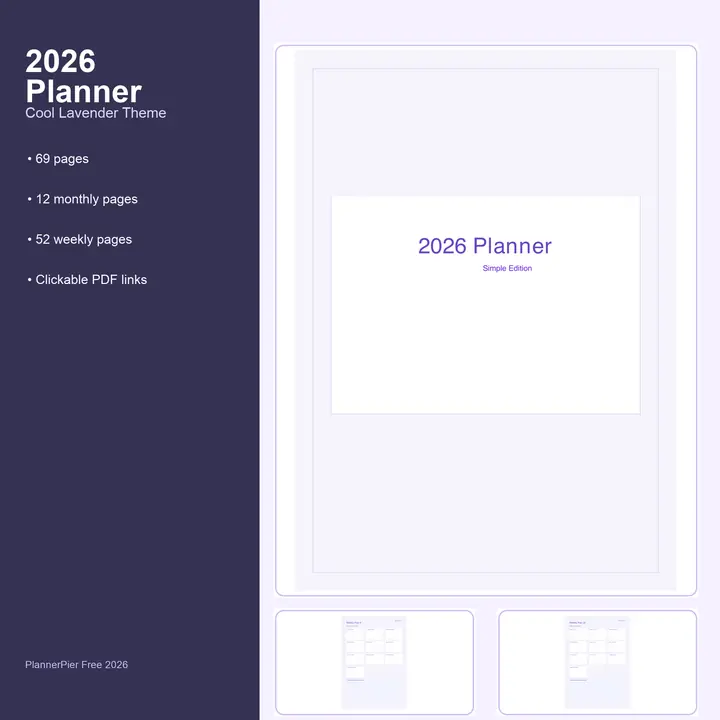
2026 Free Simple Planner
Free with any paid order: 69 pages with yearly, monthly, weekly, and notes sections.
- Free bonus with any paid PlannerPier order
- 52 weekly pages + 12 monthly pages
- Hyperlinked PDF navigation for tablet planning
This checkout bonus becomes available once your cart already includes any paid PlannerPier product.
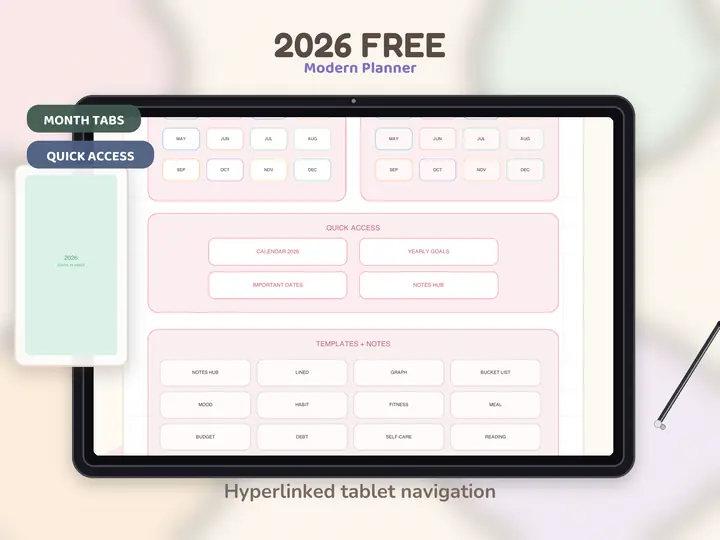
2026 Free Modern Planner
Free with any paid order: 533 hyperlinked pages for 2026 planning + notes.
- Free bonus with any paid PlannerPier order
- Tablet-optimized hyperlinked navigation
- Daily, weekly, monthly + notes hub
This checkout bonus becomes available once your cart already includes any paid PlannerPier product.
Read the guide for each PlannerPier tool
Each tool now has a matching SEO guide that explains the outcome, the best use case, and the next step into Premium or a PlannerPier product.
Buying Guide
Which Digital Planner Is Right for You? Free 60-Second Quiz
The fastest way to choose a digital planner is not scrolling through dozens of pretty listings. It is matching your weekly routine to the layout you will actually open again.
Tool Guide
How to Check if Your PDF Works in GoodNotes (Free Checker)
If a planner PDF fails inside GoodNotes, the issue is usually visible before import. A quick compatibility check saves you from buying or importing the wrong file.
Tool Guide
Tracker PDF Generator for Habit, Mood, and Sleep Planning on iPad
Trackers work best when they are fast to generate, light to maintain, and connected to a real planning problem instead of vague self-optimization.
Tool Guide
Free Calendar Maker for iPad and Printable Planning: How to Build Better Calendar Pages Fast
A simple calendar maker is often the fastest way to test whether you need a full planner or just cleaner month-level visibility.
Tool Guide
Weekly Planner Maker for iPad and Printable Weekly Pages: Build a Better Week Fast
A weekly page is often the real heart of a planning system, which is why a weekly planner maker can tell users so much about what kind of planner they actually need.
Tool Guide
Meal Planner Maker for iPad: Create Grocery Lists and Weekly Meal Prep Pages Fast
Meal planning works best when the page removes dinner decisions before the week starts, instead of asking you to invent a perfect kitchen routine from scratch.
Tool Guide
Budget & Finance Planner Tool: Build Monthly Bills, Spending, and Savings Pages Fast
A budget planner becomes useful when it turns vague money stress into visible categories you can review without opening a complex spreadsheet.
Tool Guide
Student Planner Tool for Class Schedules, Assignments, and Study Sessions on iPad
Student planning works when classes, assignments, priorities, and study sessions live on one visible page instead of across a syllabus, calendar, and scattered notes.
Tool Guide
Daily Page Maker for Focus, Time Blocking, and Top Priorities on iPad
Daily pages are most useful when they reduce noise and help users start the day with clearer tradeoffs, not bigger unrealistic to-do lists.
Wellness Tool
Gratitude Journal Maker for 30-Day Digital Journaling on iPad
A gratitude journal only helps if it feels light enough to return to on ordinary days, not just the days when self-improvement feels exciting.
Tool Guide
Custom Planner Builder for Dated Digital Planners: Build Before You Buy
A custom planner builder reduces one of the biggest purchase frictions in digital planning: not knowing whether the structure will actually match your routine.
Tool Guide
Visual Planner Page Builder: Design Custom GoodNotes Weekly Pages Without Starting From Scratch
A visual planner builder helps users stop hunting for the perfect template and start assembling the specific weekly command-center page their routine needs.
Tool Guide
Goodnotes Tabs Generator for Hyperlinked Notebooks and Digital Planners
Tabs are one of the features that make a digital planner feel premium, which is exactly why a tool that generates them can solve a high-value problem quickly.
Tool Guide
Planner Assembler: Merge GoodNotes PDFs Into One Custom Digital Planner
Planner Assembler is for the moment when separate useful pages stop being enough and you want one organized PDF instead of a folder full of loose exports.
AI Planning
AI Planner Studio: Turn Brain Dumps, Meetings, and Goals Into Weekly Planner Systems
AI planning helps most when it turns messy input into a clearer next action system, not when it generates another long list you still have to organize yourself.
Freebies
Free Planner Sticker of the Week for Goodnotes and iPad Planning
Stickers only improve planning when they add clarity, emphasis, or personality without turning the page into a distraction.
Beginner Guide
Digital Planning 101 Beginner Guide for iPad Users: Start Without Overwhelm
Beginner digital planning content works when it turns confusion into momentum, not when it overwhelms readers with every possible app, template, and setup trick at once.