Best iPad for Digital Planning: What Actually Matters Before You Buy
Find out what matters most when choosing the best iPad for digital planning, from screen size and stylus comfort to portability, storage, and workflow fit.
Photo by Adrian Regeci on Pexels.
The best iPad for digital planning is rarely the most expensive one. It is the one that makes your planner easy to open, easy to write in, and easy to keep using.
Free Tool
Not sure which planner setup fits your device?
Take the PlannerPier quiz and get a faster answer on which planner style fits your workflow, experience level, and planning goals.
Use the Find Your Planner quizWhat digital planning actually needs from an iPad
Digital planning is not a demanding workflow in the same way video editing or design production is. A planner PDF inside Goodnotes, Notability, or a similar app does not need extreme performance. What it does need is a pleasant experience. The tablet should make reading, writing, and moving through your planner feel smooth enough that planning becomes easy to repeat.
That is why the best buying decision starts with planning habits, not hardware status. If your iPad opens your planner quickly, feels comfortable to write in, and is light enough to stay near you during the week, it already clears most of the real barriers. The more important question is whether the device reduces friction or adds another layer of overthinking to your setup.
Why screen size matters more than people expect
A larger screen can make weekly spreads, dashboard pages, and notes sections easier to read and write on. That sounds like an obvious win, and for some people it is. If you use your tablet mainly at a desk, plan in long sessions, or want more room to see your pages at once, more screen space can feel noticeably calmer.
But bigger tablets also change how often you carry them. If you want your planner with you on the sofa, in a cafe, or inside a lighter bag, portability matters. A device that feels slightly less spacious but much easier to keep nearby may end up supporting your routine better than one that looks ideal on paper but gets left behind.
- arrow_right_altChoose more screen space if you plan mostly at a desk.
- arrow_right_altChoose more portability if your planner needs to move with you.
- arrow_right_altDo not treat size as a status question. Treat it as a habit question.
Product spotlight
A clean planner that works well on most iPad setups
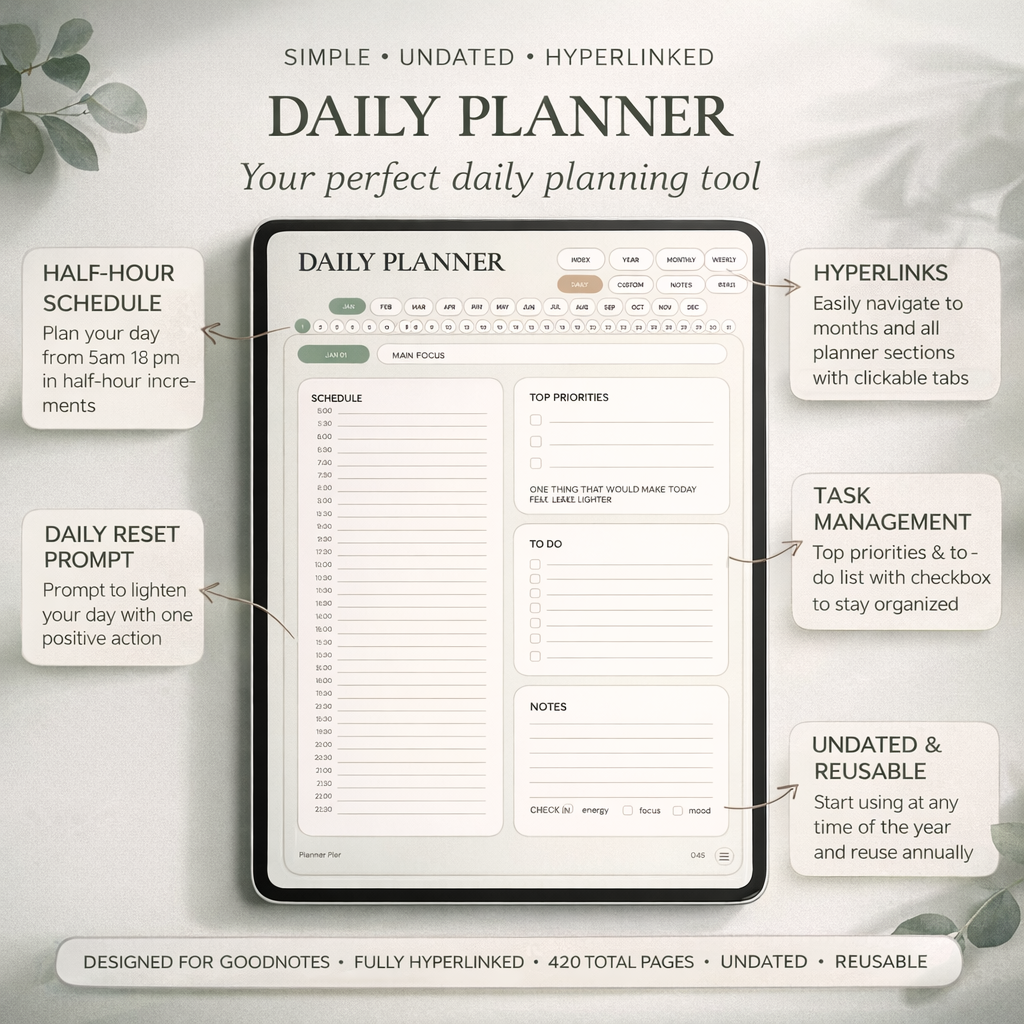
PlannerPier's Simple Undated Digital Planner is a strong match for first-time tablet planners because it keeps navigation obvious and handwriting space useful.
- check_circleWeekly, daily, monthly, and notes pages in one linked file
- check_circleEasy fit for Goodnotes and Notability users
- check_circleMinimal design that stays readable across different screen sizes
Apple Pencil comfort is part of the planning system
Handwriting feel matters because digital planning is built around repeated small interactions. A weekly reset, a quick note, a changed appointment, a top-priority list, or a short reflection all depend on writing feeling natural. If the stylus experience feels awkward, you will notice it every day. That is why Pencil compatibility and responsiveness matter more than many comparison articles admit.
This is also where planner design matters. Clean page layouts with enough writing room make handwriting feel better immediately. PlannerPier products like the Simple Undated Digital Planner, the Kawaii Cat Digital Planner 2026, and the ADHD Digital Planner 2026 are built for stylus-based tablet use, so the experience feels practical instead of cramped.
How much storage do planner users really need
Most digital planner files, notebook PDFs, and sticker packs are not especially large compared with photo libraries, video files, or heavier creative apps. If your iPad is mainly for planning, note-taking, reading, and light admin work, storage pressure may be less dramatic than you expect. A lot of people overspend here because they assume digital planning itself is storage-intensive when it usually is not.
The better way to think about storage is to ask whether planning is your main use case or only one part of a broader device workflow. If the same iPad will also hold study materials, business documents, design apps, photos, or creative projects, then storage matters more. In other words, buy for your wider tablet life, not for the planner alone.
The best device is the one that removes barriers
A lot of buying advice online treats planning like a hardware hobby. Real planning success comes from the opposite mindset. The right iPad is the one that makes it easier to review your week, capture tasks before they disappear, and keep your planner close to your actual decisions. If the device feels too heavy, too expensive to use casually, or too precious to carry around, it may quietly reduce follow-through instead of improving it.
That is why it is smarter to buy enough tablet for the habit you want, then choose the planner that matches it. A calmer minimalist workflow may pair well with the Simple Undated Digital Planner. A more guided system may pair better with the ADHD Digital Planner 2026. A note-heavy workflow often becomes stronger with the Digital Notebook for iPad & GoodNotes. Device and planner should support each other.
How to make the decision without overthinking it
Ask a few practical questions. Do you want a planner device or an all-purpose tablet? Do you value a larger writing surface more than portability? Will you use Apple Pencil often enough that writing comfort matters daily? Does the cost still leave room for the planner files and accessories you actually need? These questions are more useful than obsessing over the newest chip or most premium model.
If your goal is better organization, calmer weekly planning, and a planner you will truly open, choose the iPad that supports that routine with the least resistance. Then pair it with a planner designed for real use, not just pretty thumbnails. That combination will improve your planning habit far more than chasing a device spec sheet to its limit.
Frequently asked questions
Do I need the most expensive iPad for digital planning?
No. Most planner workflows do not need high-end performance. Screen comfort, Pencil support, and portability matter more.
Is a larger iPad always better for Goodnotes planners?
Not always. A larger screen helps with writing room, but portability can matter more if you plan in different places throughout the day.
Does digital planning use a lot of storage?
Usually not. Planner PDFs and notebook files are relatively light unless your tablet also stores lots of media or heavier creative work.
Which PlannerPier product fits a new iPad planner setup?
Most new tablet planners start well with the Simple Undated Digital Planner, then add a notebook or a more guided planner if their workflow expands.
Choose the tablet setup you will actually use
Build a calmer digital planning system with an iPad setup that fits your routine, then pair it with a PlannerPier planner designed for real tablet use.