A digital planner is more than a PDF on a tablet. It is a handwriting-friendly planning system that can reduce clutter, save time, and make it easier to return to your routine.
Free Tool
Need a calmer starting point?
Use PlannerPier's Digital Planning 101 tool to understand the basics before you commit to a full planner setup.
Open Digital Planning 101What a digital planner actually is
A digital planner is a tablet-friendly planning file, usually delivered as a PDF, that you import into an app like Goodnotes or Notability. Once it is inside the app, you can write on it with an Apple Pencil or stylus, move between sections using tabs or hyperlinks, duplicate useful pages, and keep notes, goals, trackers, and weekly plans inside one place.
That makes it different from a simple calendar app. A calendar is mainly for appointments and time-based events. A digital planner can hold your monthly overview, weekly spread, daily priorities, habit tracker, journaling pages, project notes, meal ideas, and personal planning routines together. In practice, it feels closer to a flexible paper planner and notebook system combined inside your tablet.
Why so many iPad users switch to digital planning
The biggest reason is not aesthetics. It is friction. A lot of people already use their iPad for notes, reading, study, or admin tasks, so keeping planning there reduces the number of places their life is scattered across. Instead of juggling a paper planner, sticky notes, screenshots, and separate notes apps, they can keep one organized system open and ready.
Digital planning also works well for people who like handwriting but want more flexibility. If you miss a week, you can simply reopen the next useful page. If a daily layout works well, you can duplicate it. If your planner needs a notebook section, tracker, or dashboard, those can all live in the same file. That flexibility is why a digital planner often feels easier to maintain than a rigid paper system once life gets layered.
- arrow_right_altKeep planning and note-taking in one iPad workflow.
- arrow_right_altReuse pages without wasting paper or starting from scratch.
- arrow_right_altMove faster between months, weeks, notes, and trackers with hyperlinks.
Product spotlight
A low-clutter first planner for iPad
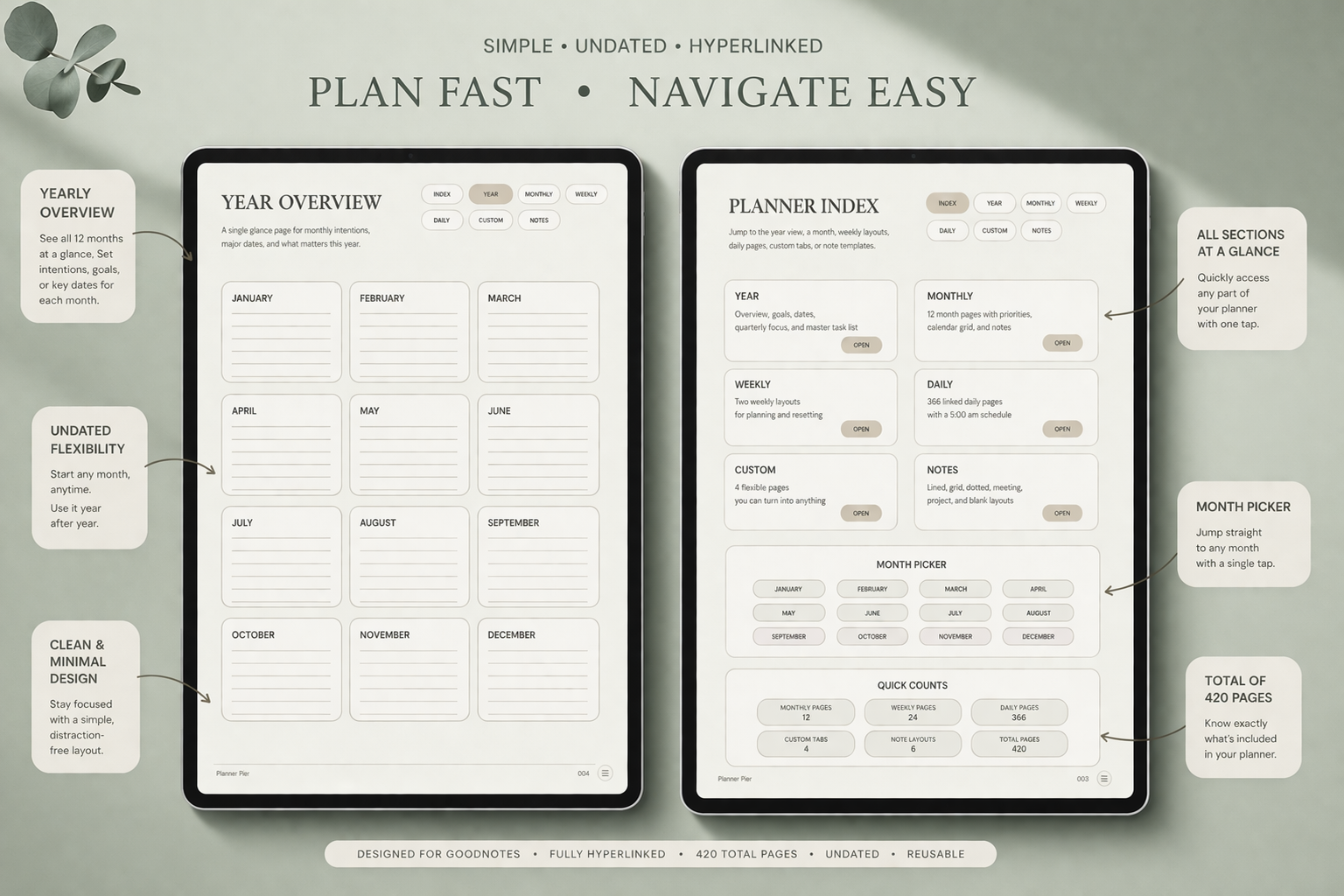
PlannerPier's Simple Undated Digital Planner gives beginners a clean linked dashboard, monthly pages, weekly pages, daily pages, and notes sections without overwhelming extras.
- check_circleUndated structure you can start anytime
- check_circleHyperlinked navigation for faster planning
- check_circleBuilt for Goodnotes, Notability, and tablet planning routines
How digital planners work in Goodnotes and Notability
The basic workflow is simple. You buy or download a planner PDF, import it into your app, and start writing directly on the pages. If the file is hyperlinked, tabs can take you to specific months, weeks, or notes sections without endless scrolling. That is why the best digital planners feel more like a workspace than a static document.
Goodnotes is often the default recommendation for planner-first users because linked PDF navigation feels especially intuitive there, while Notability is a strong fit for users who want planning close to study notes, meeting notes, or audio-based workflows. Either way, the planner file matters as much as the app. A clean structure with obvious page types will usually outperform a prettier file with confusing navigation.
Who benefits most from a digital planner
Digital planners work especially well for people who want structure without losing flexibility. That includes students who need their schedule next to class notes, professionals who want a calmer weekly planning system, parents managing multiple responsibilities, and anyone who feels their paper planning has started spilling into too many extra notebooks and reminders.
They are also a strong fit for users who like the feeling of handwriting but want a more adaptable system. If your schedule changes often, an undated or lightly structured digital planner can be easier to sustain than a paper planner that makes every missed week visible. If you need more reference space, adding a digital notebook beside your planner can make the whole system feel much more complete.
- arrow_right_altBusy iPad users who already work digitally.
- arrow_right_altPeople with changing schedules who need easier re-entry.
- arrow_right_altUsers who want planning, notes, and trackers to live together.
How to choose your first digital planner without getting overwhelmed
The smartest first choice is usually the simplest one. Instead of buying the planner with the most inserts or the most decorative extras, start with the planner that fits your real routine. Ask whether you need an undated planner you can start anytime, a dated annual planner with more structure, or a notebook companion that can hold project notes and reference material.
PlannerPier products are designed around that practical decision. The Simple Undated Digital Planner is a strong starting point if you want clean reusable structure. The ADHD Digital Planner 2026 adds more guided support for attention, re-entry, and lower-friction follow-through. The Digital Notebook for iPad & GoodNotes helps when your planner needs a stronger notes and reference system beside it.
The best way to start using one this week
Do not try to use every feature at once. Start with one monthly page, one weekly spread, and one notes page. Put in the dates and commitments that are already real. Then choose only a few priorities that would make the week feel more under control. This gives the planner a real job immediately instead of turning setup into its own project.
Once the routine feels natural, then add more. Maybe that means a daily page on heavier days, a habit tracker, or a linked notebook section. The goal is not to build the prettiest planner. The goal is to create a planning system that saves time, lowers mental clutter, and feels easy enough to keep using next week.
Frequently asked questions
What is a digital planner used for?
A digital planner is used for weekly planning, daily priorities, notes, tracking habits, journaling, budgeting, and organizing projects inside a tablet-friendly system.
Do I need Goodnotes to use a digital planner?
No. Goodnotes is popular, but digital planners can also work in Notability and other note-taking apps that support PDF annotation and links.
Is a digital planner better than a paper planner?
It depends on your routine, but digital planners are often better for people who want more flexibility, less clutter, and one place for planning plus notes.
Which PlannerPier product is best for beginners?
Most beginners start well with the Simple Undated Digital Planner, then add the Digital Notebook or a more guided planner later if needed.
Start digital planning with less friction
If you want a clear planner system that saves time and feels natural on iPad, explore PlannerPier's beginner-friendly digital planners and notebooks.