Quarterly Planning in a Digital Planner on iPad: A 90-Day System That Actually Gets Used
Learn how to do quarterly planning in a digital planner on iPad with Goodnotes-friendly weekly structure, habit tracking, review pages, and realistic 90-day goal management.
Photo by Adrian Regeci on Pexels.
Quarterly planning works when it translates big goals into a weekly rhythm you can still see on a tired Tuesday. The iPad planner is only useful if it helps that translation happen faster.
Need one support layer, not a giant overhaul?
Build a focused tracker for the habits behind your quarter
PlannerPier's Tracker Generator is a practical add-on when you want to monitor consistency without crowding your main digital planner.
Open Tracker GeneratorWhy quarterly planning feels smarter than annual planning for many people
Annual goals are useful for direction, but they are often too far away to shape behavior today. A quarter is different. Ninety days is long enough to make real progress and short enough to create urgency. That makes quarterly planning one of the most practical ways to use a digital planner, especially for people who want visible progress without turning their whole life into a productivity experiment.
This is also why the keyword has strong search intent. The reader already understands that goals matter. What they need is a way to hold goals close to weekly action. A digital planner on iPad can do that well because the quarter, the month, the week, and the daily page can live inside one navigation flow rather than being scattered across a notebook, a spreadsheet, and memory.
Start with one quarter theme, not ten disconnected goals
The most common mistake in quarterly planning is overloading the quarter with too many priorities. A better approach is to choose one main theme and a few measurable outcomes under it. That theme might be stabilizing your finances, rebuilding routines, improving client delivery, finishing a semester strongly, or protecting your energy. The point is not to become smaller. The point is to become clearer.
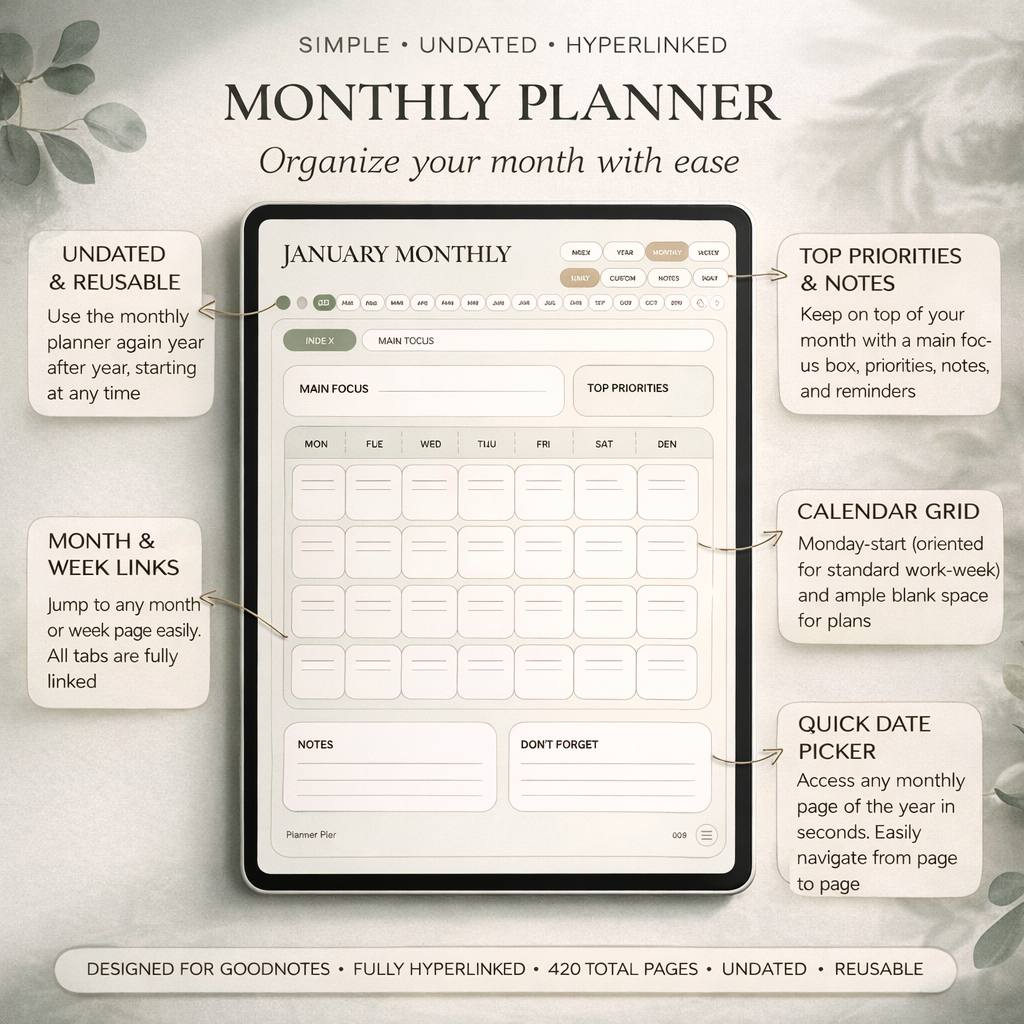
Once the theme is chosen, use your planner to define what done looks like. What will be different by the end of the quarter? Which habits support that result? Which weekly actions make progress visible? A simple planner such as the Simple Undated Digital Planner for iPad works well because it gives you room to build a quarter without locking you into dated pressure if you need to restart mid-stream.
- arrow_right_altChoose one quarter theme that answers what matters most right now.
- arrow_right_altLimit the quarter to a few measurable outcomes instead of an endless wish list.
- arrow_right_altDefine the weekly behaviors that move the outcomes forward before the quarter even starts.
Product spotlight
A planner that lets the quarter stay clear
PlannerPier's Simple Undated Digital Planner is useful for quarterly planning because it keeps weekly and monthly structure visible without locking the user into a dated sequence that becomes frustrating after a reset.
- check_circleGood fit for 90-day planning, weekly resets, and outcome-based goal tracking
- check_circleFlexible enough for restarts when a quarter goes off-script
- check_circleSupports clarity better than overloaded all-in-one files
Translate the quarter into monthly and weekly checkpoints
A quarter becomes usable only when it is broken down. Start with three monthly checkpoint questions: what needs to be true by the end of month one, month two, and month three? Then move down again into weekly planning. Your weekly spread is where quarterly planning becomes real. It should show priorities, scheduled work, follow-up items, and enough notes space to notice what is drifting.
This is where digital planning quietly outperforms paper for many users. You can keep the quarterly overview, the current month, the current week, and your related notes in one portable file on iPad. Hyperlinked navigation makes it easier to zoom out and zoom back in without losing context. The planner stops being a place for vague intentions and becomes a control panel for the next seven days.
Use habit tracking as support, not as the entire plan
Habit tracking can strengthen a quarter, but it should not replace actual planning. Too many people build a beautiful tracker and still avoid the harder weekly decisions that would move the goal. A better use of habit tracking is to support the behaviors that make the quarter more likely to succeed: study sessions, outreach, sleep, workouts, reading, meal prep, or daily planning itself.
If you want a lighter way to add that layer, a tool such as PlannerPier's Tracker Generator can help you create a focused tracker instead of crowding the main planner file with pages you do not need. That keeps the quarter visible while still giving you a simple way to measure consistency. The tracker supports the system. It should not become the system.
The weekly review is what saves the quarter
A quarterly plan usually fails quietly, not dramatically. The goals stay in the file, but the weeks start happening without reference to them. That is why the weekly review matters so much. Once a week, open the quarter page, look at your current month, and ask three things: what moved, what stalled, and what needs to change next week? That small rhythm keeps the quarter alive.
This is also where many competitor products under-serve the user. They offer many templates for goals and habits but do not teach the review loop that holds everything together. PlannerPier can do better by making the weekly reset part of the content strategy, the tool story, and the product explanation. The article is not only selling a planner. It is teaching the rhythm that makes the planner valuable.
Where PlannerPier fits in a 90-day planning workflow
PlannerPier's opportunity here is strong because a quarter naturally combines planning pages, trackers, and flexible notes. A user may start with a simple planner, add a focused tracker, and then use a notebook or builder tool later if the workflow becomes more customized. That is a much healthier upgrade path than forcing a giant all-in-one file from the start.
For readers who want a practical next step, the most natural message is simple: build a quarter you can revisit. Start with a clean planner, add only the support pages you will truly use, and review the system every week. That keeps the planning grounded, and it makes the product recommendation feel useful rather than aspirational.
Frequently asked questions
How do you do quarterly planning in a digital planner?
Start with one quarter theme, break it into a few measurable outcomes, translate those into monthly checkpoints, and review progress weekly inside your planner.
Is a digital planner good for 90-day goals?
Yes. A digital planner is useful for 90-day goals because it keeps quarterly notes, monthly checkpoints, weekly actions, and supportive trackers in one place.
Do I need a separate habit tracker for quarterly planning?
Not always. Use a separate tracker only if it supports the quarter clearly. It should help the plan, not distract from the weekly work.
Turn the next 90 days into a planning system you will actually revisit
Visit https://www.plannerpier.com/ to explore planners and tools that make quarterly planning, weekly review, and habit tracking feel calmer on iPad.