Sunday Reset With a Digital Planner on iPad: A Weekly Routine That Saves Time All Week
Create a Sunday reset routine in your digital planner with weekly review, meal prep prompts, task sorting, and Goodnotes-friendly planning steps for a calmer week.

Photo by Jakub Zerdzicki on Pexels.
A Sunday reset is useful when it shortens Monday decision-making. The best digital planner routine is not elaborate. It is the one that clears mental clutter and shows what the week actually needs.
Want to customize your reset page first?
Build a weekly layout with the exact reset sections you actually use
PlannerPier's Visual Planner Page Builder helps you test meal, admin, focus, and review areas before you switch to a new planner layout.
Open Visual Planner Page BuilderWhy a weekly reset matters more than most productivity hacks
Many planning systems fail because they focus on capture and decoration but ignore reset. Ideas enter the planner, tasks accumulate, and the week ends without a true review. By Monday, the user is carrying unfinished decisions, forgotten errands, and vague anxiety into a new schedule. A weekly reset interrupts that cycle. It gives the brain a point of closure and a fresh entry into the next seven days.
That is why the Sunday reset keyword is so commercially valuable. The reader is not casually browsing. They want a routine they can actually keep. They are often busy, overloaded, and tired of starting each week in reaction mode. A digital planner on iPad can support this well because it lets the user move between calendar context, task lists, meal ideas, notes, and habits without scattering the routine across several apps or scraps of paper.
Start with closure before you start with goals
A useful Sunday reset begins by looking backward briefly. What was finished, what rolled over, what still matters, and what should be deleted entirely? This step is important because many people carry stale tasks forward automatically. That makes each new week heavier than it needs to be. A reset should reduce weight, not just rearrange it.
Once you close the previous week honestly, the new week becomes easier to shape. You are planning from clarity instead of from accumulation. This is one reason calmer planners tend to outperform crowded ones during resets. When the layout is readable, you can see what still deserves attention and what was only emotional clutter.
- arrow_right_altReview unfinished tasks and decide whether they should be done, delayed, delegated, or deleted.
- arrow_right_altScan appointments and deadlines for the coming week before creating a task list.
- arrow_right_altCapture any loose thoughts into one notes space instead of spreading them across several pages.
Product spotlight
A weekly reset planner that stays calm under real-life pressure
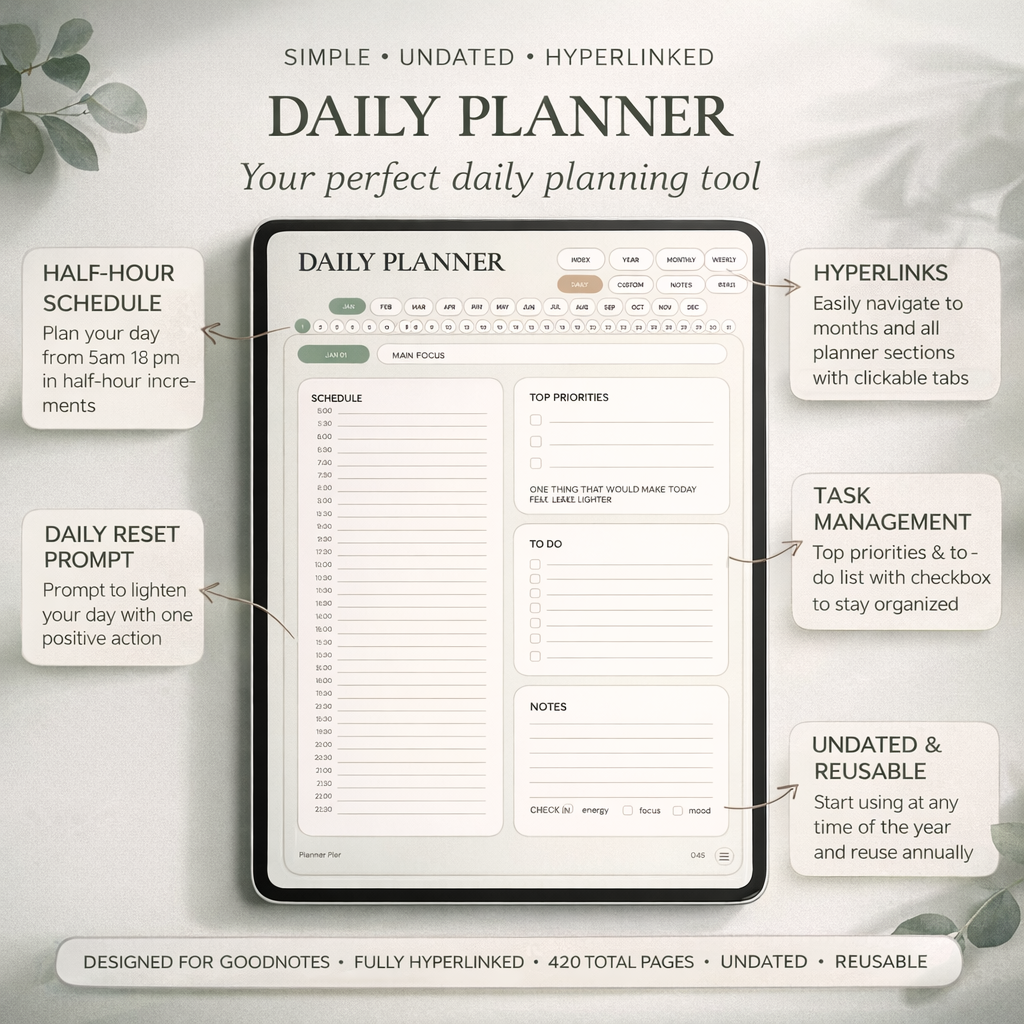
PlannerPier's Simple Undated Digital Planner gives users a clean weekly planning layer that works especially well for Sunday resets, weekly reviews, and restart-friendly routines.
- check_circleClean month, week, day, notes, and custom sections
- check_circleStrong fit for busy professionals, parents, and restart-heavy users
- check_circleFlexible enough to adapt when each week looks different
Build your week around anchors, not around hope
After closure, look for weekly anchors. These are the fixed points that shape the rest of your time: work shifts, meetings, school events, appointments, errands, social plans, and recurring home tasks. Once those anchors are visible, the rest of the planning becomes more realistic. You stop filling the week with generic ambition and start noticing where focused work can actually fit.
This is where the Simple Undated Digital Planner is especially effective. Its clean monthly and weekly structure gives enough room to see commitments without overwhelming the user with unnecessary inserts. For people who want a weekly reset they will actually repeat, that kind of clarity matters more than decorative abundance.
Use one reset section for meals, admin, and life maintenance
A weekly reset often breaks down because home-life tasks stay invisible until they become urgent. Meal planning, groceries, laundry, cleaning, school prep, bill reminders, and refill tasks can easily eat into the week if they are never named upfront. A small reset section for life maintenance can prevent that. It does not need to be elaborate. It only needs to make the week feel less reactive.
PlannerPier's [Visual Planner Page Builder](/tools/visual-planner-page-builder) is useful here because many users discover they want a weekly page that includes a small meal area, admin area, or reset checklist. Instead of forcing those needs into a generic layout, the builder can help test what belongs on the page before committing to a larger system change.
Why the weekly reset should stay short enough to repeat
A Sunday reset is not supposed to become a half-day project. If the routine is too long, you will skip it on the exact weeks when you need it most. The better standard is repeatability. Twenty to thirty focused minutes is often enough to review the week behind you, sort the week ahead, and reduce mental load significantly.
This is where many social-media planning routines miss the mark. They are aesthetically satisfying to watch, but not structurally easy to keep. PlannerPier can outperform that style of content by teaching a reset that feels lighter, more adult, and more useful in ordinary life. That kind of practicality supports both SEO and conversion because it earns trust.
What a reset checklist can include without becoming overwhelming
A practical reset checklist might include five short prompts: clear inbox tasks, review the calendar, choose top priorities, note meals or groceries, and prepare one thing that will make Monday easier. That is enough to reduce friction without turning the reset into another perfection project. The checklist should support judgment, not replace it.
This kind of checklist is also ideal for digital planning because it can live beside the weekly spread and be reused each week. Over time, the checklist becomes a cue that helps the routine start faster. Instead of wondering how to begin the reset, the user follows a familiar sequence that lowers resistance and builds consistency.
How PlannerPier products and tools fit the weekly reset search
This search intent sits close to conversion because the user already wants a routine, not only inspiration. PlannerPier can answer that intent by recommending a clean planner for the weekly view, a custom page builder for users who need a different reset section, and note-friendly companion products when extra planning context starts crowding the week.
For a low-pressure weekly system, the Simple Undated Digital Planner is the most natural core recommendation. For users who want more structured support around overwhelm and resets, the ADHD Digital Planner 2026 offers a stronger guided feel. The article can help the reader choose based on their weekly friction rather than on generic aesthetics.
Frequently asked questions
What should a Sunday reset include in a digital planner?
A useful Sunday reset usually includes a quick review of unfinished tasks, upcoming appointments, weekly priorities, and a small section for meals or home admin.
How long should a weekly reset take?
It should be short enough to repeat consistently. Around twenty to thirty minutes is often enough for a practical weekly reset.
Which digital planner is best for a weekly reset routine?
A calm, readable planner with clear weekly pages is usually best. Many users do well with an undated planner because it keeps resets flexible and low pressure.
Set up a weekly reset that makes Monday lighter instead of busier
Explore PlannerPier at https://www.plannerpier.com/ if you want digital planners and planning tools that support realistic weekly resets and calmer iPad routines.