How to Use an Undated Digital Planner Without Feeling Like You Have to Start Over
Learn how to use an undated digital planner on iPad with a low-pressure weekly routine, flexible restarts, and a calmer Goodnotes workflow that keeps you planning consistently.
Photo by Adrian Regeci on Pexels.
An undated digital planner works best when it removes the guilt of missed weeks and gives you a structure you can re-enter quickly instead of constantly rebuilding from scratch.
Not sure what your weekly page should include?
Test your ideal layout before changing your whole system
PlannerPier's Visual Planner Page Builder helps you shape a weekly page around your actual routine instead of guessing what will work.
Open Visual Planner Page BuilderWhy dated planners quietly fail for many people
A dated planner looks motivating at the beginning because the year feels mapped, polished, and ready. The problem usually appears after real life interrupts the routine. A busy work stretch, travel week, family issue, exam period, or energy dip can leave several dated pages blank. Once that happens, many users feel they have broken the system, even though the real issue is that the planner expected perfect continuity from an imperfect life.
That is exactly why the search for an undated digital planner is so high intent. People are not only shopping for page design. They are looking for permission to plan in a way that survives inconsistency. An undated planner lowers the emotional cost of pausing. Instead of seeing unused pages as failure, the user can simply pick up at the next useful point and keep going.
What makes an undated digital planner easier to keep
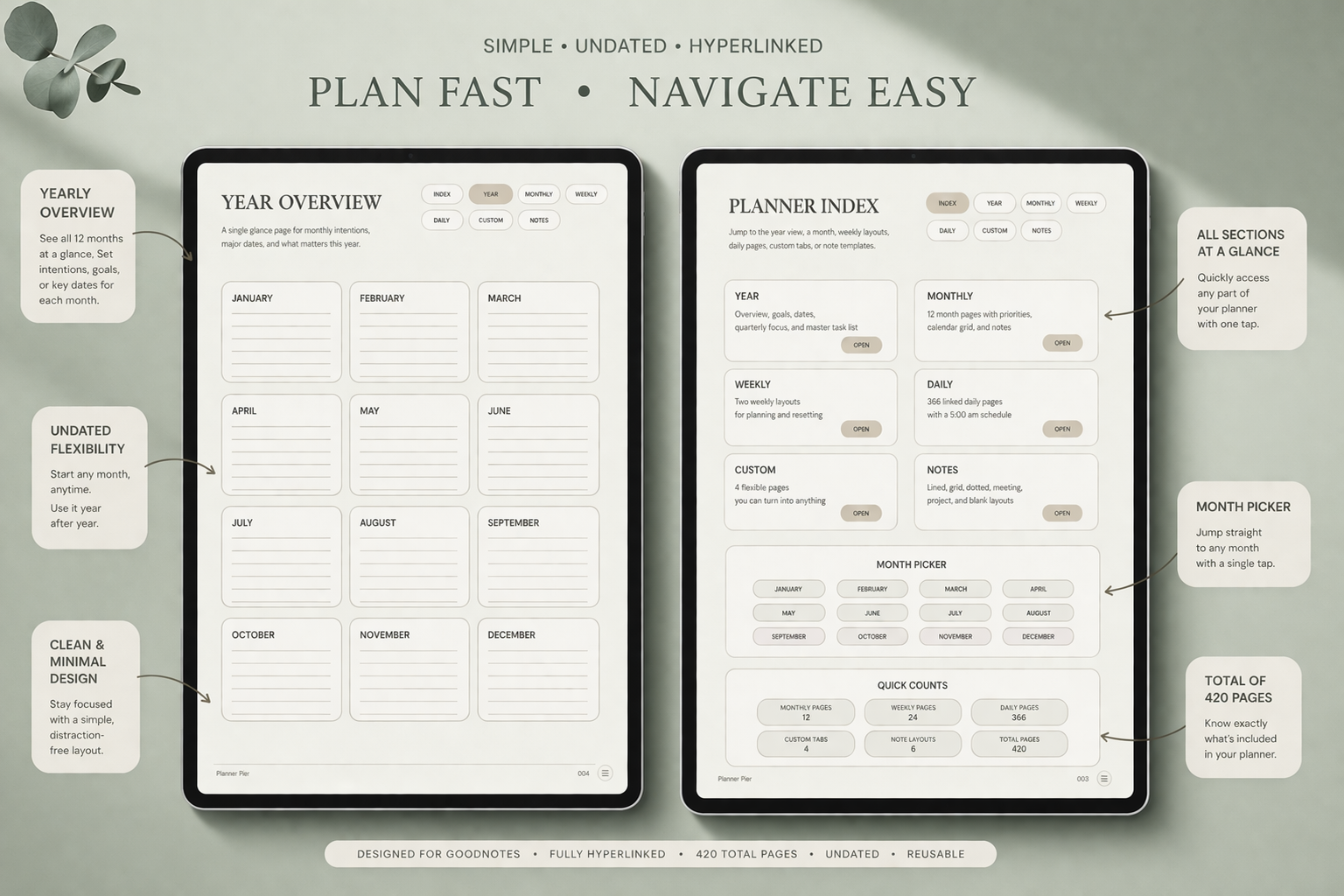
The best undated digital planner is not empty. It still needs structure. What changes is the relationship between structure and time. Instead of locking the user to fixed calendar dates, the planner gives monthly, weekly, daily, and notes pages that can be activated when needed. That means the file still supports planning discipline, but it stops punishing interruptions.
This is one reason the Simple Undated Digital Planner is such a practical fit. It gives the user enough guidance to feel organized while leaving space for changing seasons, pause points, and fresh starts. That balance matters because too little structure creates drift, while too much structure creates avoidance.
- arrow_right_altUse an undated planner if your weeks change shape often and you dislike wasted pages.
- arrow_right_altUse an undated planner if your biggest planning problem is re-entry after falling behind.
- arrow_right_altUse an undated planner if you want one system that can flex across work, life, and personal projects.
Product spotlight
A planner built for re-entry, not perfection
PlannerPier's Simple Undated Digital Planner helps users start when they are ready, pause when life shifts, and return without wasting pages or momentum.
- check_circleIncludes monthly, weekly, daily, custom, and notes sections
- check_circleAvailable in Monday-start and Sunday-start versions
- check_circleStrong fit for beginners, busy seasons, and restart-heavy routines
Build a minimum routine you can restart in under ten minutes
Many planner routines break because they become too ceremonial. If restarting requires decorating a cover, renaming sections, rewriting goals, and choosing the perfect sticker palette, you have created a ritual instead of a planning tool. A better undated workflow is brutally simple. Open the current month page, mark the next meaningful dates, review your weekly spread, and choose the next few tasks that deserve space.
That re-entry routine should take less than ten minutes. The goal is not to create a dramatic reset moment every time life gets messy. The goal is to make restarting so easy that you do not delay it. This is one of the strongest psychological benefits of undated planning on iPad. Your system stays visually clean, but it also stays forgiving.
Use monthly pages for orientation and weekly pages for decisions
An undated planner works best when each page layer has a job. The monthly page is for orientation. It helps you see appointments, deadlines, events, and seasonal pressure. The weekly page is where real decisions happen. It shows what matters now, what can wait, and what needs a dedicated time slot. If you need deep focus support, a daily page can then narrow attention even further.
This layered structure is especially useful for users who tend to over-plan after a break. Instead of trying to fix the whole month at once, you re-enter one layer at a time. That keeps planning realistic. It also makes product recommendations more natural. Someone who wants a calm planning core can stay with the Simple Undated Digital Planner. Someone who needs more weekly support around overwhelm may also benefit from the ADHD Digital Planner 2026.
Why shame is one of the biggest hidden planning problems
A surprising number of people stop using planners because the pages remind them of what they did not do. That makes planning emotionally heavy. The user does not avoid the planner because they do not care. They avoid it because opening it creates friction, self-criticism, and the feeling of being behind. Dated pages amplify that problem. Undated pages soften it.
This matters strategically because the best SEO content does not only define products. It names the real problem behind the search. In this case, the buyer is often asking for flexibility, but underneath that request is a desire for a planning system that feels safe to reopen. That is a strong angle for PlannerPier because the brand can speak directly to sustainability, not just features.
How to pair an undated planner with the right support tools
An undated planner becomes even more effective when it is paired with support layers that stay light. A digital notebook can hold project notes, reading notes, or idea storage so the main planner stays clean. A simple tracker can support habits without crowding the weekly spread. A custom page builder can help the user test what belongs in the planner before they commit to a more complex setup.
That is where PlannerPier's broader platform becomes valuable. The Digital Notebook for Goodnotes pairs well with an undated planner when deeper notes need a home. The [Visual Planner Page Builder](/tools/visual-planner-page-builder) helps users test layout ideas if they are unsure what their ideal weekly page should include. The blog content and product ecosystem reinforce each other because they solve adjacent parts of the same problem.
How PlannerPier should convert this search gently
This keyword responds best to reassurance, not pressure. The user is often tired of abandoning systems. A hard-sell tone would feel out of touch. The stronger conversion path is to explain why undated planning works, show how a low-pressure setup looks in practice, and then recommend a product that supports re-entry instead of perfection.
That makes the CTA feel earned. Rather than promising that one planner will fix everything, the article can help the reader understand why their previous planning systems felt brittle. Once they feel seen, the Simple Undated Digital Planner becomes a logical next step instead of an impulse purchase.
Frequently asked questions
Who should use an undated digital planner?
Undated planners are especially helpful for people with changing schedules, restart-heavy routines, or inconsistent planning habits because they remove the pressure of unused dated pages.
Is an undated planner better than a dated planner?
It depends on your routine. An undated planner is often better when flexibility and easy restarts matter more than having the year mapped in advance.
How do you restart an undated planner after a break?
Re-enter through a short reset: review the month, choose the current week, and add only the next useful priorities instead of trying to backfill everything you missed.
Choose a planning system that lets you restart without guilt
Explore PlannerPier's undated digital planner collection at https://www.plannerpier.com/ if you want a calmer iPad workflow that stays usable even when life gets interrupted.